Datafold’s Data Explorer maps lineage and profiles across your data assets, helping you understand the impact of changes across systems.
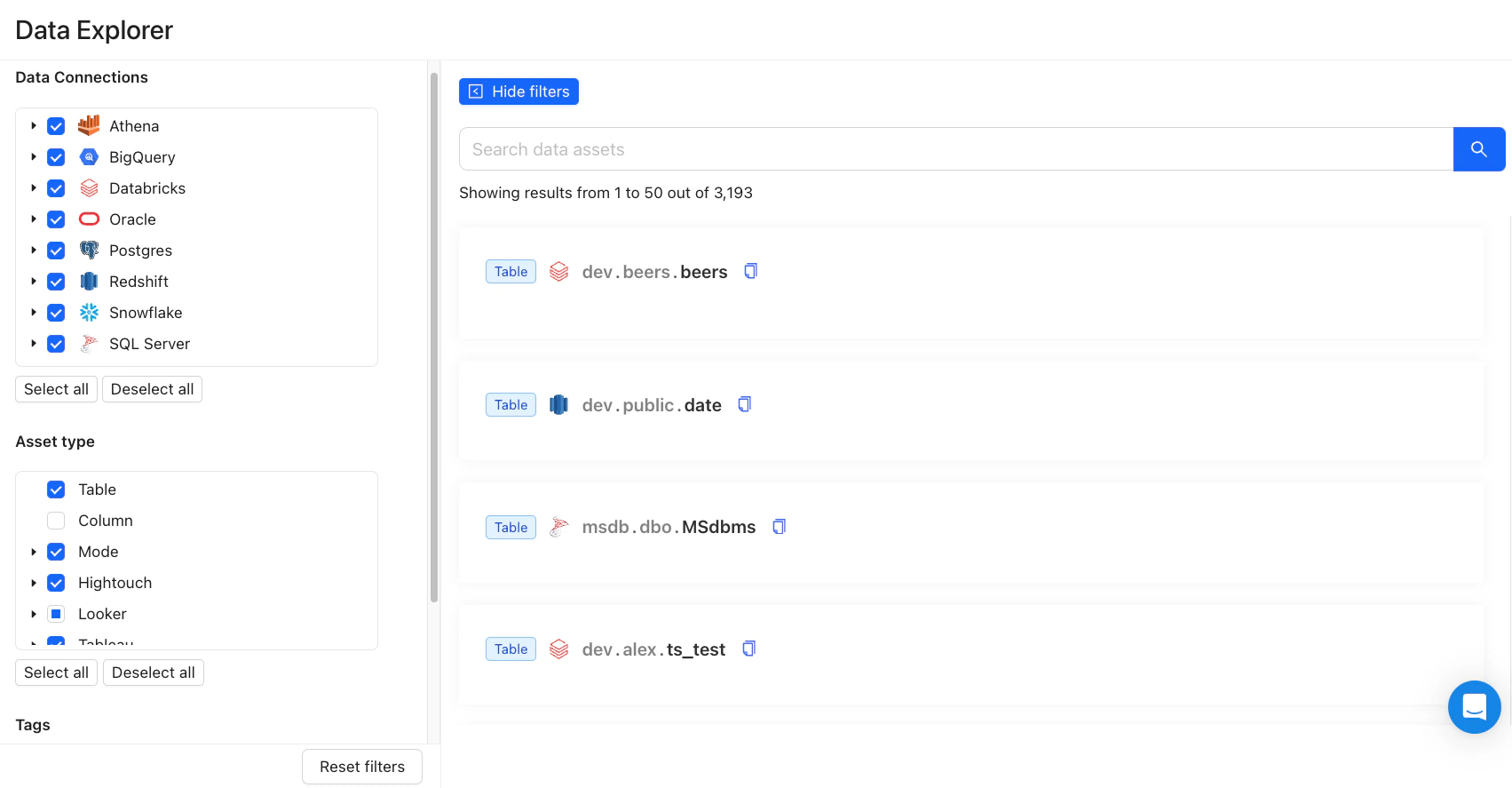
Our Data Explorer offers a comprehensive overview of your data assets, including Lineage and Profiles. It is built from your warehouse metadata and query history, plus your dbt and BI integrations. The same lineage and metadata are available to AI assistants via MCP.You can filter data assets by Data Connections, Tags, Data Owners, and Asset Types (e.g., tables, columns, and BI-created assets such as views, reports, and syncs). You can also search directly to find specific data assets for lineage analysis.
Data App Lineage Overview
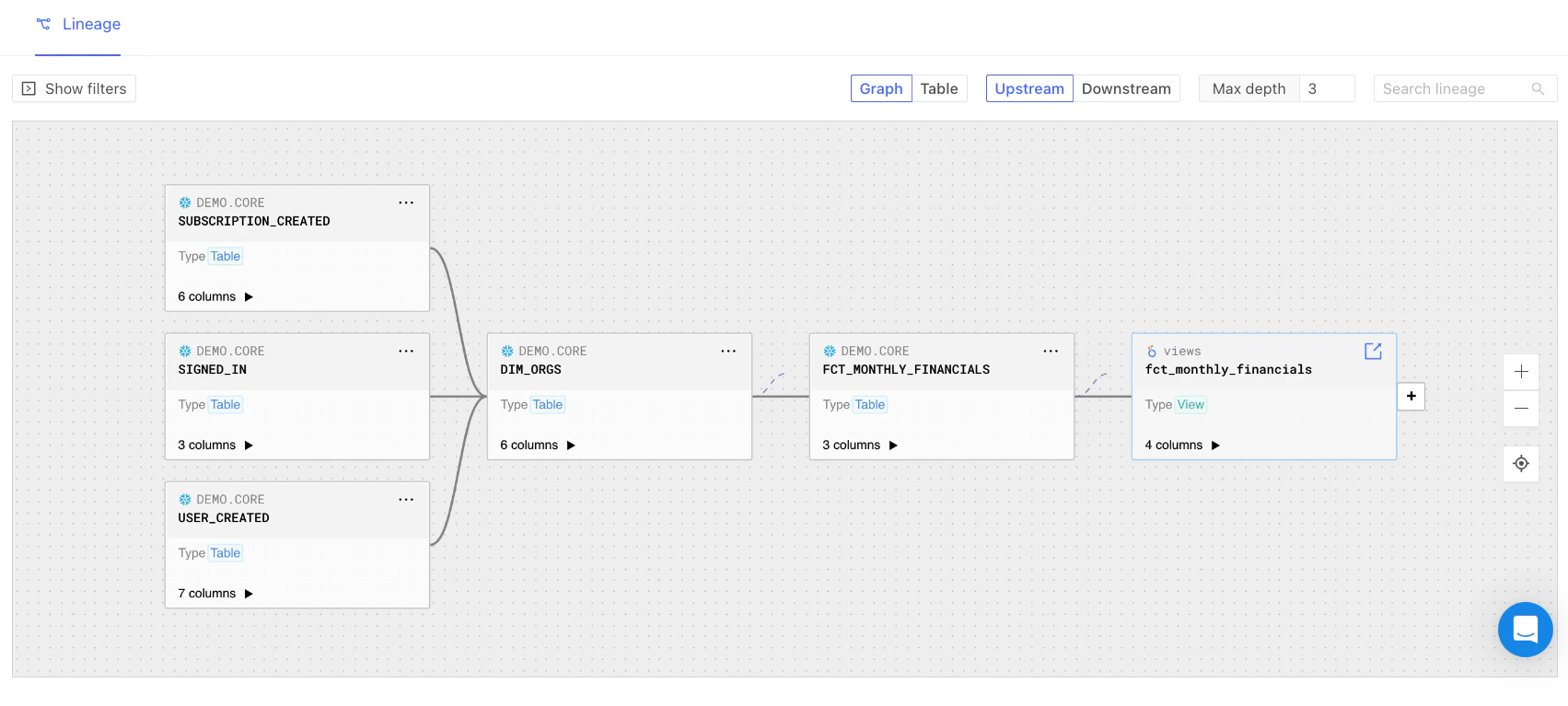
After selecting a table or data asset, the UI will display a graph of table-level lineage by default. You can toggle between Upstream and Downstream perspectives and customize the lineage view by adjusting the Max Depth parameter to your preference.
Lineage Graph
⌘I
{"docsConfig":{"theme":"maple","$schema":"https://mintlify.com/docs.json","name":"Datafold","colors":{"primary":"#3d75ff","light":"#3d75ff","dark":"#3d75ff"},"logo":"https://mintcdn.com/datafold/4ZNRDufNo9R1p08Q/logo/datafold_logo.png?fit=max\u0026auto=format\u0026n=4ZNRDufNo9R1p08Q\u0026q=85\u0026s=d2d28c3f09cecdfeb1086040b11f50c8","favicon":"https://mintcdn.com/datafold/7pWtpSckJi2T0xZR/favicon.png?fit=max\u0026auto=format\u0026n=7pWtpSckJi2T0xZR\u0026q=85\u0026s=42812fe3d36148668be5e38a44dbc9c0","background":{"decoration":"gradient"},"navbar":{"links":[{"href":"https://us.datafold.com/login","label":"Login"}],"primary":{"type":"button","label":"Request a Demo","href":"https://www.datafold.com/demo"}},"footer":{"socials":{"linkedin":"https://get.datafold.com/linkedin","x":"https://get.datafold.com/twitter","github":"https://github.com/datafold/data-diff","youtube":"https://get.datafold.com/youtube"}},"integrations":{"gtm":{"tagId":"GTM-W3G3TXJ"}},"styling":{"latex":false},"navigation":{"global":{"anchors":[{"anchor":"About Datafold","icon":{"style":"duotone","name":"house"},"href":"https://www.datafold.com/"},{"anchor":"Blog","icon":{"style":"duotone","name":"pen"},"href":"https://www.datafold.com/blog?"}]},"pages":[]}},"deployment":{"deploymentMetadataValue":{"subdomain":"datafold","hasAudioNarration":false,"actualSubdomain":"datafold","customDomains":["docs.datafold.com"],"gitSource":{"type":"github","owner":"datafold","repo":"docs","deployBranch":"main","contentDirectory":"","isPrivate":true,"mountPath":"","label":""},"chroma":{"liveDeploymentHistoryId":"6ae477d2c4061e91428d8e76","collectionId":"b71047e8-6c16-4c52-b601-f993c078e585","schemaVersion":"v3","latestBuiltDeploymentHistoryId":"6ae477d2c4061e91428d8e76"},"entitlements":{"AI_CHAT":{"status":"ENABLED"},"WEB_MCP":{"status":"ENABLED"},"NARRATION":{"status":"ENABLED"}},"buildId":"6ae478fc39bc6f1b8c4fb51d","clientVersion":"0.0.4021","searchFilterCounts":[{"language":"default","tag":"Documentation","count":185},{"language":"default","tag":"API Reference","count":89},{"language":"default","tag":"INTEGRATIONS","count":89},{"language":"default","tag":"Databases","count":40},{"language":"default","tag":"SECURITY","count":28},{"language":"default","tag":"Monitors","count":25},{"language":"default","tag":"DATA DIFFS","count":20},{"language":"default","tag":"LLM Providers","count":20},{"language":"default","tag":"Frequently Asked Questions","count":17},{"language":"default","tag":"FAQ","count":17}]},"assistantConfig":{},"basePath":"","hasChatPermissions":true,"hasWebMcpPermissions":true,"toggles":[{"name":"kill-isr","enabled":true,"variant":{"name":"disabled","enabled":false,"feature_enabled":true},"impressionData":false},{"name":"agent-mintlify-slack","enabled":true,"variant":{"name":"disabled","enabled":false,"feature_enabled":true},"impressionData":false},{"name":"agent-integrations-settings","enabled":true,"variant":{"name":"disabled","enabled":false,"feature_enabled":true},"impressionData":false},{"name":"automations-pr-grouping","enabled":true,"variant":{"name":"disabled","enabled":false,"feature_enabled":true},"impressionData":false},{"name":"custom-prefix","enabled":true,"variant":{"name":"disabled","enabled":false,"feature_enabled":true},"impressionData":false},{"name":"analytics-v7","enabled":true,"variant":{"name":"disabled","enabled":false,"feature_enabled":true},"impressionData":false},{"name":"user-flows-analytics","enabled":true,"variant":{"name":"disabled","enabled":false,"feature_enabled":true},"impressionData":false},{"name":"no-publish-flow","enabled":true,"variant":{"name":"disabled","enabled":false,"feature_enabled":true},"impressionData":false},{"name":"workos-onboarding","enabled":true,"variant":{"name":"disabled","enabled":false,"feature_enabled":true},"impressionData":false},{"name":"llms-txt-v2","enabled":true,"variant":{"name":"disabled","enabled":false,"feature_enabled":true},"impressionData":false},{"name":"snapshot-serving-live","enabled":true,"variant":{"name":"disabled","enabled":false,"feature_enabled":true},"impressionData":false},{"name":"stripTemperatureMiddleware","enabled":true,"variant":{"name":"disabled","enabled":false,"feature_enabled":true},"impressionData":false},{"name":"support-platform-pylon-zendesk","enabled":true,"variant":{"name":"disabled","enabled":false,"feature_enabled":true},"impressionData":false},{"name":"snapshot-serving","enabled":true,"variant":{"name":"disabled","enabled":false,"feature_enabled":true},"impressionData":false},{"name":"instant-rollback","enabled":true,"variant":{"name":"disabled","enabled":false,"feature_enabled":true},"impressionData":false},{"name":"granular-notifications-server","enabled":true,"variant":{"name":"disabled","enabled":false,"feature_enabled":true},"impressionData":false},{"name":"granular-notifications","enabled":true,"variant":{"name":"disabled","enabled":false,"feature_enabled":true},"impressionData":false},{"name":"automations-fable","enabled":true,"variant":{"name":"disabled","enabled":false,"feature_enabled":true},"impressionData":false},{"name":"fixed-ai-action-pricing","enabled":true,"variant":{"name":"disabled","enabled":false,"feature_enabled":true},"impressionData":false},{"name":"automation-resolve-merge-conflict","enabled":true,"variant":{"name":"disabled","enabled":false,"feature_enabled":true},"impressionData":false},{"name":"scoped-publishing","enabled":true,"variant":{"name":"disabled","enabled":false,"feature_enabled":true},"impressionData":false},{"name":"mintql","enabled":true,"variant":{"name":"disabled","enabled":false,"feature_enabled":true},"impressionData":false},{"name":"page-level-analytics","enabled":true,"variant":{"name":"disabled","enabled":false,"feature_enabled":true},"impressionData":false},{"name":"editor-version-history-v2","enabled":true,"variant":{"name":"disabled","enabled":false,"feature_enabled":true},"impressionData":false},{"name":"billing-page-v2","enabled":true,"variant":{"name":"disabled","enabled":false,"feature_enabled":true},"impressionData":false},{"name":"workspace-projects","enabled":true,"variant":{"name":"disabled","enabled":false,"feature_enabled":true},"impressionData":false},{"name":"assistant-v5","enabled":true,"variant":{"name":"disabled","enabled":false,"feature_enabled":true},"impressionData":false},{"name":"byok-sep-25","enabled":true,"variant":{"name":"disabled","enabled":false,"feature_enabled":true},"impressionData":false},{"name":"fork-pr-previews","enabled":true,"variant":{"name":"disabled","enabled":false,"feature_enabled":true},"impressionData":false},{"name":"revalidation-jwt","enabled":true,"variant":{"name":"disabled","enabled":false,"feature_enabled":true},"impressionData":false},{"name":"vite-origin","enabled":true,"variant":{"name":"disabled","enabled":false,"feature_enabled":true},"impressionData":false},{"name":"billing-updated-9-15","enabled":true,"variant":{"name":"disabled","enabled":false,"feature_enabled":true},"impressionData":false},{"name":"workos-sso-scim","enabled":true,"variant":{"name":"disabled","enabled":false,"feature_enabled":true},"impressionData":false},{"name":"hobby-abuse-scan","enabled":true,"variant":{"name":"disabled","enabled":false,"feature_enabled":true},"impressionData":false},{"name":"dashboard-inbox","enabled":true,"variant":{"name":"disabled","enabled":false,"feature_enabled":true},"impressionData":false},{"name":"workos-signup","enabled":true,"variant":{"name":"disabled","enabled":false,"feature_enabled":true},"impressionData":false},{"name":"workos-enabled","enabled":true,"variant":{"name":"disabled","enabled":false,"feature_enabled":true},"impressionData":false},{"name":"approve-review-flow","enabled":true,"variant":{"name":"disabled","enabled":false,"feature_enabled":true},"impressionData":false}],"googleFontsInlined":false},"customCss":[{"filePath":"styles.css","content":"@font-face{font-family:'Poppins';src:url(chrome-extension://opafjjlpbiaicbbgifbejoochmmeikep/fonts/Poppins-Medium.woff);font-weight:400;font-style:normal;font-display:swap}h5.pl-4.mb-3\\.5.lg\\:mb-2\\.5.font-semibold{font-size:.75rem;margin-top:0;margin-bottom:0;padding-left:1rem}"}],"page":{"pagePath":"classic/data-explorer/how-it-works","slug":"/classic/data-explorer/how-it-works","pageMetadata":{"title":"How It Works","description":"Datafold's Data Explorer maps lineage and profiles across your data assets, helping you understand the impact of changes across systems.","href":"/classic/data-explorer/how-it-works"},"description":{"compiledSource":"\"use strict\";\nconst {jsx: _jsx} = arguments[0];\nconst {useMDXComponents: _provideComponents} = arguments[0];\nfunction _createMdxContent(props) {\n const _components = {\n p: \"p\",\n ..._provideComponents(),\n ...props.components\n };\n return _jsx(_components.p, {\n children: \"Datafold’s Data Explorer maps lineage and profiles across your data assets, helping you understand the impact of changes across systems.\"\n });\n}\nfunction MDXContent(props = {}) {\n const {wrapper: MDXLayout} = {\n ..._provideComponents(),\n ...props.components\n };\n return MDXLayout ? _jsx(MDXLayout, {\n ...props,\n children: _jsx(_createMdxContent, {\n ...props\n })\n }) : _createMdxContent(props);\n}\nreturn {\n default: MDXContent\n};\n","frontmatter":{},"scope":{}},"pageType":"default","mdx":{"mdxSource":{"compiledSource":"\"use strict\";const{Fragment:_Fragment,jsx:_jsx,jsxs:_jsxs}=arguments[0];const{useMDXComponents:_provideComponents}=arguments[0];function _createMdxContent(props){const _components={a:`a`,p:`p`,strong:`strong`,..._provideComponents(),...props.components},{Frame,OptimizedImage}=_components;if(!Frame)_missingMdxReference(`Frame`,true);if(!OptimizedImage)_missingMdxReference(`OptimizedImage`,true);return _jsxs(_Fragment,{children:[_jsxs(_components.p,{children:[`Our `,_jsx(_components.strong,{children:`Data Explorer`}),` offers a comprehensive overview of your data assets, including `,_jsx(_components.a,{href:`/classic/data-explorer/lineage`,children:`Lineage`}),` and `,_jsx(_components.a,{href:`/classic/data-explorer/profile`,children:`Profiles`}),`. It is built from your warehouse metadata and query history, plus your dbt and BI integrations. The same lineage and metadata are available to AI assistants via `,_jsx(_components.a,{href:`/classic/datafold-mcp`,children:`MCP`}),`.`]}),`\n`,_jsx(_components.p,{children:`You can filter data assets by Data Connections, Tags, Data Owners, and Asset Types (e.g., tables, columns, and BI-created assets such as views, reports, and syncs). You can also search directly to find specific data assets for lineage analysis.`}),`\n`,_jsx(Frame,{caption:`Data App Lineage Overview`,children:_jsx(OptimizedImage,{src:`https://mintcdn.com/datafold/hQ4DukKOuaj6vjhH/images/data_app_lineage_overview-3ffe6ae5a34c4e7d8918fae232eb1ed1.png?fit=max\u0026auto=format\u0026n=hQ4DukKOuaj6vjhH\u0026q=85\u0026s=9014fc5bee3d6f583a7ea851cf7558fe`,\"data-og-width\":`1703`,width:`1703`,\"data-og-height\":`887`,height:`887`,\"data-path\":`images/data_app_lineage_overview-3ffe6ae5a34c4e7d8918fae232eb1ed1.png`,\"data-optimize\":`true`,\"data-opv\":`3`,srcset:`https://mintcdn.com/datafold/hQ4DukKOuaj6vjhH/images/data_app_lineage_overview-3ffe6ae5a34c4e7d8918fae232eb1ed1.png?w=280\u0026fit=max\u0026auto=format\u0026n=hQ4DukKOuaj6vjhH\u0026q=85\u0026s=8a1a5e2cfab0c5b299b49a93215ccd01 280w, https://mintcdn.com/datafold/hQ4DukKOuaj6vjhH/images/data_app_lineage_overview-3ffe6ae5a34c4e7d8918fae232eb1ed1.png?w=560\u0026fit=max\u0026auto=format\u0026n=hQ4DukKOuaj6vjhH\u0026q=85\u0026s=630385a4c30cf26ebdb5c1c6e8cde749 560w, https://mintcdn.com/datafold/hQ4DukKOuaj6vjhH/images/data_app_lineage_overview-3ffe6ae5a34c4e7d8918fae232eb1ed1.png?w=840\u0026fit=max\u0026auto=format\u0026n=hQ4DukKOuaj6vjhH\u0026q=85\u0026s=a94f066e41e1a6776f1b0f0bfa1876a4 840w, https://mintcdn.com/datafold/hQ4DukKOuaj6vjhH/images/data_app_lineage_overview-3ffe6ae5a34c4e7d8918fae232eb1ed1.png?w=1100\u0026fit=max\u0026auto=format\u0026n=hQ4DukKOuaj6vjhH\u0026q=85\u0026s=6ea25f18b750438941c9fd88dfe044fe 1100w, https://mintcdn.com/datafold/hQ4DukKOuaj6vjhH/images/data_app_lineage_overview-3ffe6ae5a34c4e7d8918fae232eb1ed1.png?w=1650\u0026fit=max\u0026auto=format\u0026n=hQ4DukKOuaj6vjhH\u0026q=85\u0026s=df229108a49b3697e09fa89ceea0369e 1650w, https://mintcdn.com/datafold/hQ4DukKOuaj6vjhH/images/data_app_lineage_overview-3ffe6ae5a34c4e7d8918fae232eb1ed1.png?w=2500\u0026fit=max\u0026auto=format\u0026n=hQ4DukKOuaj6vjhH\u0026q=85\u0026s=cdb6e9c57eb24c8b9f6fb2afa82e7e82 2500w`})}),`\n`,_jsxs(_components.p,{children:[`After selecting a table or data asset, the UI will display a `,_jsx(_components.strong,{children:`graph of table-level lineage`}),` by default. You can toggle between `,_jsx(_components.strong,{children:`Upstream`}),` and `,_jsx(_components.strong,{children:`Downstream`}),` perspectives and customize the lineage view by adjusting the `,_jsx(_components.strong,{children:`Max Depth`}),` parameter to your preference.`]}),`\n`,_jsx(Frame,{caption:`Lineage Graph`,children:_jsx(OptimizedImage,{src:`https://mintcdn.com/datafold/hQ4DukKOuaj6vjhH/images/data_app_lineage_graph-c33d286a7a8c4787f229e5590d32d2ff.png?fit=max\u0026auto=format\u0026n=hQ4DukKOuaj6vjhH\u0026q=85\u0026s=e55cacaf6922d256a43f3f78d90ea8b4`,\"data-og-width\":`1703`,width:`1703`,\"data-og-height\":`767`,height:`767`,\"data-path\":`images/data_app_lineage_graph-c33d286a7a8c4787f229e5590d32d2ff.png`,\"data-optimize\":`true`,\"data-opv\":`3`,srcset:`https://mintcdn.com/datafold/hQ4DukKOuaj6vjhH/images/data_app_lineage_graph-c33d286a7a8c4787f229e5590d32d2ff.png?w=280\u0026fit=max\u0026auto=format\u0026n=hQ4DukKOuaj6vjhH\u0026q=85\u0026s=b4f9bf05eb17c2adb144347d3fe1b778 280w, https://mintcdn.com/datafold/hQ4DukKOuaj6vjhH/images/data_app_lineage_graph-c33d286a7a8c4787f229e5590d32d2ff.png?w=560\u0026fit=max\u0026auto=format\u0026n=hQ4DukKOuaj6vjhH\u0026q=85\u0026s=c815bd96fa6fdb0ca3a4a534daa30288 560w, https://mintcdn.com/datafold/hQ4DukKOuaj6vjhH/images/data_app_lineage_graph-c33d286a7a8c4787f229e5590d32d2ff.png?w=840\u0026fit=max\u0026auto=format\u0026n=hQ4DukKOuaj6vjhH\u0026q=85\u0026s=d000be10b365da1e8e06ba4e952def9d 840w, https://mintcdn.com/datafold/hQ4DukKOuaj6vjhH/images/data_app_lineage_graph-c33d286a7a8c4787f229e5590d32d2ff.png?w=1100\u0026fit=max\u0026auto=format\u0026n=hQ4DukKOuaj6vjhH\u0026q=85\u0026s=2f4b67b0d071d16c4b05f7e8f687b3b4 1100w, https://mintcdn.com/datafold/hQ4DukKOuaj6vjhH/images/data_app_lineage_graph-c33d286a7a8c4787f229e5590d32d2ff.png?w=1650\u0026fit=max\u0026auto=format\u0026n=hQ4DukKOuaj6vjhH\u0026q=85\u0026s=90b34018ad4eea7f9a50d48d2f9680a6 1650w, https://mintcdn.com/datafold/hQ4DukKOuaj6vjhH/images/data_app_lineage_graph-c33d286a7a8c4787f229e5590d32d2ff.png?w=2500\u0026fit=max\u0026auto=format\u0026n=hQ4DukKOuaj6vjhH\u0026q=85\u0026s=179c1da5fc08e093049589ac22aebbb0 2500w`})})]})}function MDXContent(props={}){const{wrapper:MDXLayout}={..._provideComponents(),...props.components};return MDXLayout?_jsx(MDXLayout,{...props,children:_jsx(_createMdxContent,{...props})}):_createMdxContent(props)}return{default:MDXContent};function _missingMdxReference(id,component){throw new Error(`Expected `+(component?`component`:`object`)+\" `\"+id+\"` to be defined: you likely forgot to import, pass, or provide it.\")}","frontmatter":{},"scope":{"config":{},"pageMetadata":{"title":"How It Works","description":"Datafold's Data Explorer maps lineage and profiles across your data assets, helping you understand the impact of changes across systems.","href":"/classic/data-explorer/how-it-works"}}},"mdxSourceWithNoJs":null},"mdxExtracts":{"tableOfContents":[],"codeExamples":{}},"jsLinks":["/_mintlify/custom/datafold/d7bd0b948766e6b9/script.js","/_mintlify/custom/datafold/8c81f551ba77e4ad/login-link.js"],"subdomain":"datafold","siteName":"Datafold","title":"How It Works - Datafold","navMaps":{"firstHrefInVersion":{"Current":{"href":"/welcome","matchLevel":4},"Classic":{"href":"/classic/data-explorer/how-it-works","matchLevel":0}},"firstHrefInLanguage":{}},"lastModified":"2026-10-30T10:56:37.229Z","originalFileLocation":"classic/data-explorer/how-it-works.mdx"},"headHtml":"\u003cscript data-mint-head>(function(){var d=document.documentElement,p=null;if(!p){try{p=localStorage.getItem(\"isDarkMode\")}catch(e){}if(p==='true')p='dark';else if(p==='false')p='light';if(p!=='light'\u0026\u0026p!=='dark'\u0026\u0026p!=='system')p=\"system\"}var r=p==='system'?(matchMedia(\"(prefers-color-scheme: dark)\").matches?'dark':'light'):p;d.classList.remove(r==='dark'?'light':'dark');d.classList.add(r);d.setAttribute(\"data-theme-preference\",p)})();\u003c/script>\u003cmeta data-mint-head name=\"description\" content=\"Datafold\u0026#x27;s Data Explorer maps lineage and profiles across your data assets, helping you understand the impact of changes across systems.\">\u003cmeta data-mint-head name=\"application-name\" content=\"Datafold\">\u003cmeta data-mint-head name=\"generator\" content=\"Mintlify\">\u003clink data-mint-head rel=\"icon\" type=\"image/png\" sizes=\"192x192\" href=\"/mintlify-assets/_mintlify/favicons/datafold/EdEzedhhtpnvEoZM/_generated/favicon/android-chrome-192x192.png\" media=\"(prefers-color-scheme: light)\">\u003clink data-mint-head rel=\"apple-touch-icon\" type=\"image/png\" sizes=\"180x180\" href=\"/mintlify-assets/_mintlify/favicons/datafold/EdEzedhhtpnvEoZM/_generated/favicon/apple-touch-icon.png\">\u003clink data-mint-head rel=\"icon\" type=\"image/png\" sizes=\"16x16\" href=\"/mintlify-assets/_mintlify/favicons/datafold/EdEzedhhtpnvEoZM/_generated/favicon/favicon-16x16.png\" media=\"(prefers-color-scheme: light)\">\u003clink data-mint-head rel=\"icon\" type=\"image/png\" sizes=\"32x32\" href=\"/mintlify-assets/_mintlify/favicons/datafold/EdEzedhhtpnvEoZM/_generated/favicon/favicon-32x32.png\" media=\"(prefers-color-scheme: light)\">\u003clink data-mint-head rel=\"shortcut icon\" type=\"image/x-icon\" href=\"/mintlify-assets/_mintlify/favicons/datafold/EdEzedhhtpnvEoZM/_generated/favicon/favicon.ico\" media=\"(prefers-color-scheme: light)\">\u003clink data-mint-head rel=\"icon\" type=\"image/png\" sizes=\"192x192\" href=\"/mintlify-assets/_mintlify/favicons/datafold/EdEzedhhtpnvEoZM/_generated/favicon-dark/android-chrome-192x192.png\" media=\"(prefers-color-scheme: dark)\">\u003clink data-mint-head rel=\"icon\" type=\"image/png\" sizes=\"16x16\" href=\"/mintlify-assets/_mintlify/favicons/datafold/EdEzedhhtpnvEoZM/_generated/favicon-dark/favicon-16x16.png\" media=\"(prefers-color-scheme: dark)\">\u003clink data-mint-head rel=\"icon\" type=\"image/png\" sizes=\"32x32\" href=\"/mintlify-assets/_mintlify/favicons/datafold/EdEzedhhtpnvEoZM/_generated/favicon-dark/favicon-32x32.png\" media=\"(prefers-color-scheme: dark)\">\u003clink data-mint-head rel=\"shortcut icon\" type=\"image/x-icon\" href=\"/mintlify-assets/_mintlify/favicons/datafold/EdEzedhhtpnvEoZM/_generated/favicon-dark/favicon.ico\" media=\"(prefers-color-scheme: dark)\">\u003cmeta data-mint-head property=\"og:title\" content=\"How It Works - Datafold\">\u003cmeta data-mint-head property=\"og:description\" content=\"Datafold\u0026#x27;s Data Explorer maps lineage and profiles across your data assets, helping you understand the impact of changes across systems.\">\u003cmeta data-mint-head property=\"og:site_name\" content=\"Datafold\">\u003cmeta data-mint-head property=\"og:url\" content=\"https://docs.datafold.com/classic/data-explorer/how-it-works\">\u003cmeta data-mint-head property=\"og:type\" content=\"website\">\u003cmeta data-mint-head property=\"og:image\" content=\"https://datafold.mintlify.app/_mintlify/api/og/v2?division=DATA+EXPLORER\u0026amp;title=How+It+Works\u0026amp;description=Datafold%27s+Data+Explorer+maps+lineage+and+profiles+across+your+data+assets%2C+helping+you+understand+the+impact+of+changes+across+systems.\u0026amp;theme=b184116d1347e02f4b5f2724\u0026amp;signature=1e09cb0bf96ff38485e4d36830c3914f0278b27b8c9c3616b2500eca81796b21\">\u003cmeta data-mint-head property=\"og:image:width\" content=\"1200\">\u003cmeta data-mint-head property=\"og:image:height\" content=\"630\">\u003cmeta data-mint-head name=\"twitter:card\" content=\"summary_large_image\">\u003cmeta data-mint-head name=\"twitter:title\" content=\"How It Works - Datafold\">\u003cmeta data-mint-head name=\"twitter:description\" content=\"Datafold\u0026#x27;s Data Explorer maps lineage and profiles across your data assets, helping you understand the impact of changes across systems.\">\u003cmeta data-mint-head name=\"twitter:image\" content=\"https://datafold.mintlify.app/_mintlify/api/og/v2?division=DATA+EXPLORER\u0026amp;title=How+It+Works\u0026amp;description=Datafold%27s+Data+Explorer+maps+lineage+and+profiles+across+your+data+assets%2C+helping+you+understand+the+impact+of+changes+across+systems.\u0026amp;theme=b184116d1347e02f4b5f2724\u0026amp;signature=1e09cb0bf96ff38485e4d36830c3914f0278b27b8c9c3616b2500eca81796b21\">\u003cmeta data-mint-head name=\"twitter:image:width\" content=\"1200\">\u003cmeta data-mint-head name=\"twitter:image:height\" content=\"630\">\u003cmeta data-mint-head name=\"msapplication-config\" content=\"/mintlify-assets/_mintlify/favicons/datafold/EdEzedhhtpnvEoZM/_generated/favicon/browserconfig.xml\">\u003cmeta data-mint-head name=\"apple-mobile-web-app-title\" content=\"Datafold\">\u003cmeta data-mint-head name=\"msapplication-TileColor\" content=\"#3d75ff\">\u003clink data-mint-head rel=\"canonical\" href=\"https://docs.datafold.com/classic/data-explorer/how-it-works\">\u003clink data-mint-head rel=\"alternate\" type=\"application/xml\" href=\"/sitemap.xml\">\u003clink data-mint-head rel=\"alternate\" type=\"text/markdown\" href=\"/classic/data-explorer/how-it-works.md\">\u003cscript data-mint-head type=\"application/ld+json\">{\"@context\":\"https://schema.org\",\"@graph\":[{\"@type\":\"Organization\",\"@id\":\"https://docs.datafold.com/#organization\",\"name\":\"Datafold\",\"url\":\"https://docs.datafold.com\",\"logo\":{\"@type\":\"ImageObject\",\"url\":\"https://mintcdn.com/datafold/4ZNRDufNo9R1p08Q/logo/datafold_logo.png?fit=max\u0026auto=format\u0026n=4ZNRDufNo9R1p08Q\u0026q=85\u0026s=d2d28c3f09cecdfeb1086040b11f50c8\"}},{\"@type\":\"WebSite\",\"@id\":\"https://docs.datafold.com#website\",\"name\":\"Datafold\",\"url\":\"https://docs.datafold.com\",\"publisher\":{\"@id\":\"https://docs.datafold.com/#organization\"}},{\"@type\":\"WebPage\",\"@id\":\"https://docs.datafold.com/classic/data-explorer/how-it-works#webpage\",\"url\":\"https://docs.datafold.com/classic/data-explorer/how-it-works\",\"name\":\"How It Works\",\"description\":\"Datafold's Data Explorer maps lineage and profiles across your data assets, helping you understand the impact of changes across systems.\",\"dateModified\":\"2026-10-30T10:56:37.229Z\",\"isPartOf\":{\"@id\":\"https://docs.datafold.com#website\"},\"breadcrumb\":{\"@id\":\"https://docs.datafold.com/classic/data-explorer/how-it-works#breadcrumb\"}},{\"@type\":\"BreadcrumbList\",\"@id\":\"https://docs.datafold.com/classic/data-explorer/how-it-works#breadcrumb\",\"itemListElement\":[{\"@type\":\"ListItem\",\"position\":1,\"name\":\"Datafold\",\"item\":\"https://docs.datafold.com\"},{\"@type\":\"ListItem\",\"position\":2,\"name\":\"How It Works\",\"item\":\"https://docs.datafold.com/classic/data-explorer/how-it-works\"}]},{\"@type\":[\"Article\",\"TechArticle\"],\"@id\":\"https://docs.datafold.com/classic/data-explorer/how-it-works#article\",\"headline\":\"How It Works\",\"name\":\"How It Works\",\"description\":\"Datafold's Data Explorer maps lineage and profiles across your data assets, helping you understand the impact of changes across systems.\",\"url\":\"https://docs.datafold.com/classic/data-explorer/how-it-works\",\"mainEntityOfPage\":{\"@id\":\"https://docs.datafold.com/classic/data-explorer/how-it-works#webpage\"},\"dateModified\":\"2026-10-30T10:56:37.229Z\",\"publisher\":{\"@id\":\"https://docs.datafold.com/#organization\"},\"isPartOf\":{\"@id\":\"https://docs.datafold.com#website\"}}]}\u003c/script>\u003cscript data-mint-head type=\"application/ld+json\">{\"@context\":\"https://schema.org\",\"@type\":\"WebSite\",\"name\":\"Datafold\",\"creator\":{\"@type\":\"Organization\",\"name\":\"Mintlify\",\"url\":\"https://mintlify.com\"}}\u003c/script>","siteName":"Datafold","nav":{"global":{"anchors":[{"anchor":"About Datafold","icon":{"style":"duotone","name":"house"},"href":"https://www.datafold.com/"},{"anchor":"Blog","icon":{"style":"duotone","name":"pen"},"href":"https://www.datafold.com/blog?"}]},"versions":[{"version":"Current","default":true,"pages":[{"title":"Current","href":"/welcome"}]},{"version":"Classic","tabs":[{"tab":"Documentation","groups":[{"group":"INTRODUCTION","pages":[{"title":"Datafold","mode":"immersive","href":"/classic/welcome"},{"title":"Which version am I on?","href":"/classic/which-version"},{"title":"MCP","href":"/classic/datafold-mcp"}]},{"group":"DATA PLATFORM MIGRATIONS","pages":[{"title":"Migration Automation","mode":"immersive","href":"/classic/data-migration-automation/datafold-migration-automation"},{"title":"Datafold Migration Agent","mode":"immersive","href":"/classic/data-migration-automation/datafold-migration-agent"}]},{"group":"DATA DIFFS","pages":[{"title":"What's a Data Diff?","mode":"immersive","href":"/classic/data-diff/what-is-data-diff"},{"title":"How Datafold Diffs Data","mode":"immersive","href":"/classic/data-diff/how-datafold-diffs-data"},{"group":"In-Database Diffing","pages":[{"title":"Creating a New Data Diff","mode":"immersive","href":"/classic/data-diff/in-database-diffing/creating-a-new-data-diff"},{"title":"Results","mode":"immersive","href":"/classic/data-diff/in-database-diffing/results"},{"title":"Best Practices","mode":"immersive","href":"/classic/data-diff/in-database-diffing/best-practices"}]},{"group":"Cross-Database Diffing","pages":[{"title":"Creating a New Data Diff","mode":"immersive","href":"/classic/data-diff/cross-database-diffing/creating-a-new-data-diff"},{"title":"Results","mode":"immersive","href":"/classic/data-diff/cross-database-diffing/results"},{"title":"Best Practices","mode":"immersive","href":"/classic/data-diff/cross-database-diffing/best-practices"}]},{"title":"File Diffing","href":"/classic/data-diff/file-diffing"},{"title":"Connection Budgets","href":"/classic/data-diff/connection-budgets"}]},{"group":"CI/CD TESTING","pages":[{"title":"How Datafold in CI Works","mode":"immersive","href":"/classic/deployment-testing/how-it-works"},{"title":"AI Code Reviews","href":"/classic/deployment-testing/ai-code-reviews"},{"group":"Getting Started","pages":[{"title":"Getting Started with CI/CD Testing","sidebarTitle":"Getting Started","mode":"wide","href":"/classic/deployment-testing/getting-started"},{"group":"Universal","pages":[{"title":"No-Code","href":"/classic/deployment-testing/getting-started/universal/no-code"},{"title":"API","href":"/classic/deployment-testing/getting-started/universal/api"}]}]},{"group":"Configuration","pages":[{"title":"Configuration","href":"/classic/deployment-testing/configuration"},{"title":"Primary Key Inference","href":"/classic/deployment-testing/configuration/primary-key"},{"title":"Column Remapping","href":"/classic/deployment-testing/configuration/column-remapping"},{"group":"Data Diff CI Triggers","pages":[{"title":"Running Data Diff for Specific PRs/MRs","sidebarTitle":"Run CI On-Demand","href":"/classic/deployment-testing/configuration/datafold-ci/on-demand"},{"title":"Running Data Diff on Specific Branches","sidebarTitle":"Run CI for Specific Branches","href":"/classic/deployment-testing/configuration/datafold-ci/specifc"}]},{"group":"Model-specific CI Configuration","pages":[{"title":"SQL Filters","href":"/classic/deployment-testing/configuration/model-specific-ci/sql-filters"},{"title":"Time Travel","href":"/classic/deployment-testing/configuration/model-specific-ci/time-travel"},{"title":"Including/Excluding Columns","href":"/classic/deployment-testing/configuration/model-specific-ci/including-excluding-columns"},{"title":"Excluding Models","href":"/classic/deployment-testing/configuration/model-specific-ci/excluding-models"}]}]},{"group":"Best Practices","pages":[{"title":"Slim Diff","href":"/classic/deployment-testing/best-practices/slim-diff"},{"title":"Handling Data Drift","href":"/classic/deployment-testing/best-practices/handling-data-drift"}]}]},{"group":"DATA MONITORS","pages":[{"group":"Monitor Types","pages":[{"title":"Monitor Types","href":"/classic/data-monitoring/monitor-types"},{"title":"Data Diff Monitors","href":"/classic/data-monitoring/monitors/data-diff-monitors"},{"title":"Metric Monitors","href":"/classic/data-monitoring/monitors/metric-monitors"},{"title":"Data Test Monitors","href":"/classic/data-monitoring/monitors/data-test-monitors"},{"title":"Schema Change Monitors","href":"/classic/data-monitoring/monitors/schema-change-monitors"}]},{"title":"Monitors as Code","description":"Manage Datafold monitors via version-controlled YAML for greater scalability, governance, and flexibility in code-based workflows.","href":"/classic/data-monitoring/monitors-as-code"}]},{"group":"DATA EXPLORER","pages":[{"title":"How It Works","href":"/classic/data-explorer/how-it-works"},{"title":"Lineage","description":"Datafold offers a column-level and tabular lineage view.","href":"/classic/data-explorer/lineage"},{"title":"Profile","href":"/classic/data-explorer/profile"},{"group":"Best Practices","pages":[{"title":"dbt Metadata Sync","href":"/classic/data-explorer/best-practices/dbt-metadata-sync"}]}]},{"group":"INTEGRATIONS","pages":[{"group":"Databases","pages":[{"title":"Set Up Your Data Connection","sidebarTitle":"Data Connections","href":"/classic/integrations/databases"},{"title":"Snowflake","href":"/classic/integrations/databases/snowflake"},{"title":"Snowflake key-pair authentication","sidebarTitle":"Snowflake key-pair auth","href":"/classic/integrations/databases/snowflake-key-pair-authentication"},{"title":"BigQuery","href":"/classic/integrations/databases/bigquery"},{"title":"Athena","href":"/classic/integrations/databases/athena"},{"title":"Redshift","href":"/classic/integrations/databases/redshift"},{"title":"Databricks","href":"/classic/integrations/databases/databricks"},{"title":"PostgreSQL","href":"/classic/integrations/databases/postgresql"},{"title":"Microsoft SQL Server","href":"/classic/integrations/databases/sql-server"},{"title":"Azure Synapse Analytics","href":"/classic/integrations/databases/synapse"},{"title":"Oracle","href":"/classic/integrations/databases/oracle"},{"title":"MySQL","href":"/classic/integrations/databases/mysql"},{"title":"Dremio","href":"/classic/integrations/databases/dremio"},{"title":"SAP HANA","href":"/classic/integrations/databases/sap-hana"},{"title":"Starburst","href":"/classic/integrations/databases/starburst"},{"title":"Teradata","href":"/classic/integrations/databases/teradata"},{"title":"Netezza","href":"/classic/integrations/databases/netezza"},{"title":"MariaDB","href":"/classic/integrations/databases/mariadb"},{"title":"IBM Db2","href":"/classic/integrations/databases/ibm-db2"},{"title":"Microsoft Fabric Data Warehouse","sidebarTitle":"Microsoft Fabric","href":"/classic/integrations/databases/microsoft-fabric"}]},{"title":"OAuth Support","sidebarTitle":"OAuth","href":"/classic/integrations/oauth"},{"group":"Agents","pages":[{"title":"Slack Bot","sidebarTitle":"Slack Bot","href":"/classic/integrations/agents/slack-bot"}]},{"group":"LLM Providers","pages":[{"title":"Bring Your Own LLM Provider","sidebarTitle":"LLM Providers","href":"/classic/integrations/llm-providers"},{"title":"OpenAI-compatible","href":"/classic/integrations/llm-providers/openai-compatible"},{"title":"OpenAI","href":"/classic/integrations/llm-providers/openai"},{"title":"Anthropic","href":"/classic/integrations/llm-providers/anthropic"},{"title":"Google Gemini","href":"/classic/integrations/llm-providers/google-gemini"},{"title":"Azure AI Foundry","href":"/classic/integrations/llm-providers/azure-ai-foundry"},{"title":"AWS Bedrock","href":"/classic/integrations/llm-providers/aws-bedrock"},{"title":"Google Vertex AI","href":"/classic/integrations/llm-providers/google-vertex-ai"},{"title":"Databricks","href":"/classic/integrations/llm-providers/databricks"},{"title":"Snowflake Cortex","href":"/classic/integrations/llm-providers/snowflake-cortex"}]},{"group":"Orchestrators","pages":[{"title":"Integrate with Orchestrators","sidebarTitle":"Orchestrators","href":"/classic/integrations/orchestrators"},{"title":"dbt Core","href":"/classic/integrations/orchestrators/dbt-core"},{"title":"dbt Cloud","href":"/classic/integrations/orchestrators/dbt-cloud"},{"title":"Custom Integrations","href":"/classic/integrations/orchestrators/custom-integrations"}]},{"group":"BI \u0026 Data Apps","pages":[{"title":"Business Intelligence Integrations","sidebarTitle":"BI \u0026 Data Apps","href":"/classic/integrations/bi-data-apps"},{"title":"Looker","href":"/classic/integrations/bi-data-apps/looker"},{"title":"Tableau","href":"/classic/integrations/bi-data-apps/tableau"},{"title":"Power BI","href":"/classic/integrations/bi-data-apps/power-bi"},{"title":"Mode","href":"/classic/integrations/bi-data-apps/mode"},{"title":"Hightouch","href":"/classic/integrations/bi-data-apps/hightouch"},{"title":"Tracking Jobs","href":"/classic/integrations/bi-data-apps/tracking-jobs"},{"title":"dbt Exposures","sidebarTitle":"dbt Exposures","href":"/classic/integrations/bi-data-apps/dbt"}]},{"group":"Notifications","pages":[{"title":"Slack","href":"/classic/integrations/notifications/slack"},{"title":"Microsoft Teams","href":"/classic/integrations/notifications/microsoft-teams"},{"title":"PagerDuty","href":"/classic/integrations/notifications/pagerduty"}]},{"group":"Code Repositories","pages":[{"title":"Integrate with Code Repositories","sidebarTitle":"Code Repositories","href":"/classic/integrations/code-repositories"},{"title":"GitHub","href":"/classic/integrations/code-repositories/github"},{"title":"GitLab","href":"/classic/integrations/code-repositories/gitlab"},{"title":"Bitbucket","href":"/classic/integrations/code-repositories/bitbucket"},{"title":"Azure DevOps","href":"/classic/integrations/code-repositories/azure-devops"}]}]},{"group":"CLASSIC DEPLOYMENT","pages":[{"title":"Classic Deployment Options","sidebarTitle":"Overview","href":"/classic/datafold-deployment/classic-deployment-options"},{"title":"Datafold VPC Deployment on AWS (Classic)","sidebarTitle":"AWS","href":"/classic/datafold-deployment/dedicated-cloud/aws"},{"title":"Datafold VPC Deployment on GCP (Classic)","sidebarTitle":"GCP","href":"/classic/datafold-deployment/dedicated-cloud/gcp"},{"title":"Datafold VPC Deployment on Azure (Classic)","sidebarTitle":"Azure","href":"/classic/datafold-deployment/dedicated-cloud/azure"}]},{"group":"SECURITY","pages":[{"title":"Compliance \u0026 Trust Center","url":"https://security.datafold.com/","href":"/classic/security/compilance-trust-center"},{"title":"Securing Connections","href":"/classic/security/securing-connections"},{"title":"AWS PrivateLink Setup Guide","href":"/classic/security/aws_privatelink_setup"},{"title":"User Roles and Permissions","href":"/classic/security/user-roles-and-permissions"},{"title":"Service Accounts","href":"/classic/security/service-accounts"},{"title":"MCP Tool Permissions","href":"/classic/security/mcp-tool-permissions"},{"group":"Single Sign-On (SSO)","pages":[{"title":"Single Sign-On","href":"/classic/security/single-sign-on"},{"title":"Okta (OIDC)","href":"/classic/security/single-sign-on/okta"},{"title":"Google OAuth","href":"/classic/security/single-sign-on/google-oauth"},{"group":"SAML","pages":[{"title":"SAML","href":"/classic/security/single-sign-on/saml"},{"title":"Group Provisioning","href":"/classic/security/single-sign-on/saml/group-provisioning"},{"group":"Examples","pages":[{"title":"Okta","href":"/classic/security/single-sign-on/saml/examples/okta"},{"title":"Microsoft Entra ID","href":"/classic/security/single-sign-on/saml/examples/microsoft-entra-id-configuration"},{"title":"Google","href":"/classic/security/single-sign-on/saml/examples/google"}]}]}]}]},{"group":"SUPPORT","pages":[{"title":"Support","href":"/classic/support/support"},{"title":"FAQ","url":"/faq/overview","href":"/classic/support/faq-redirect"}]}]},{"tab":"API Reference","pages":[{"title":"API Reference","href":"/classic/api-reference/datafold-api"}]},{"tab":"Frequently Asked Questions","pages":[{"title":"Frequently Asked Questions","href":"/classic/faq/overview"}]}]}]},"title":"How It Works - Datafold","buildId":"dpl_EnxDqhjaNc9a8MVa833TGULPd9uJ","deploymentId":"dpl_EnxDqhjaNc9a8MVa833TGULPd9uJ","dynamics":["07c022d89b","a74be98ba7"],"chunks":["Frame-CIbhtp2j.js","DynamicMarkdown-CtpgKJwj.js","zoom-image-lightbox-CVZVK4hN.js","lightbox-handle-r17bVUz3.js"]}