> ## Documentation Index
> Fetch the complete documentation index at: https://docs.datafold.com/llms.txt
> Use this file to discover all available pages before exploring further.
# SAML
> SAML (Security Assertion Markup Language) is a protocol that enables secure user authentication by integrating Identity Providers (IdPs) with Service Providers (SPs).
**NOTE**
SAML SSO is available for both SaaS and VPC installations of Datafold.
In this case, Datafold is the service provider. The Identity Providers can be anything used by the organization (e.g., Google, Okta, Duo).
We also support SAML SSO [group provisioning](/security/single-sign-on/saml/group-provisioning).
## Generic SAML Identity Providers
**TIP**
We also provide SAML identity providers configurations for ([Okta](/security/single-sign-on/saml/examples/okta), [Microsoft Entra ID](/security/single-sign-on/saml/examples/microsoft-entra-id-configuration), and [Google](/security/single-sign-on/saml/examples/google))
To configure a SAML provider:
1. Go to `Datafold`. Create a new integration by navigating to **Settings** → **Integrations** → **SSO** → **Add new integration** → **SAML**.
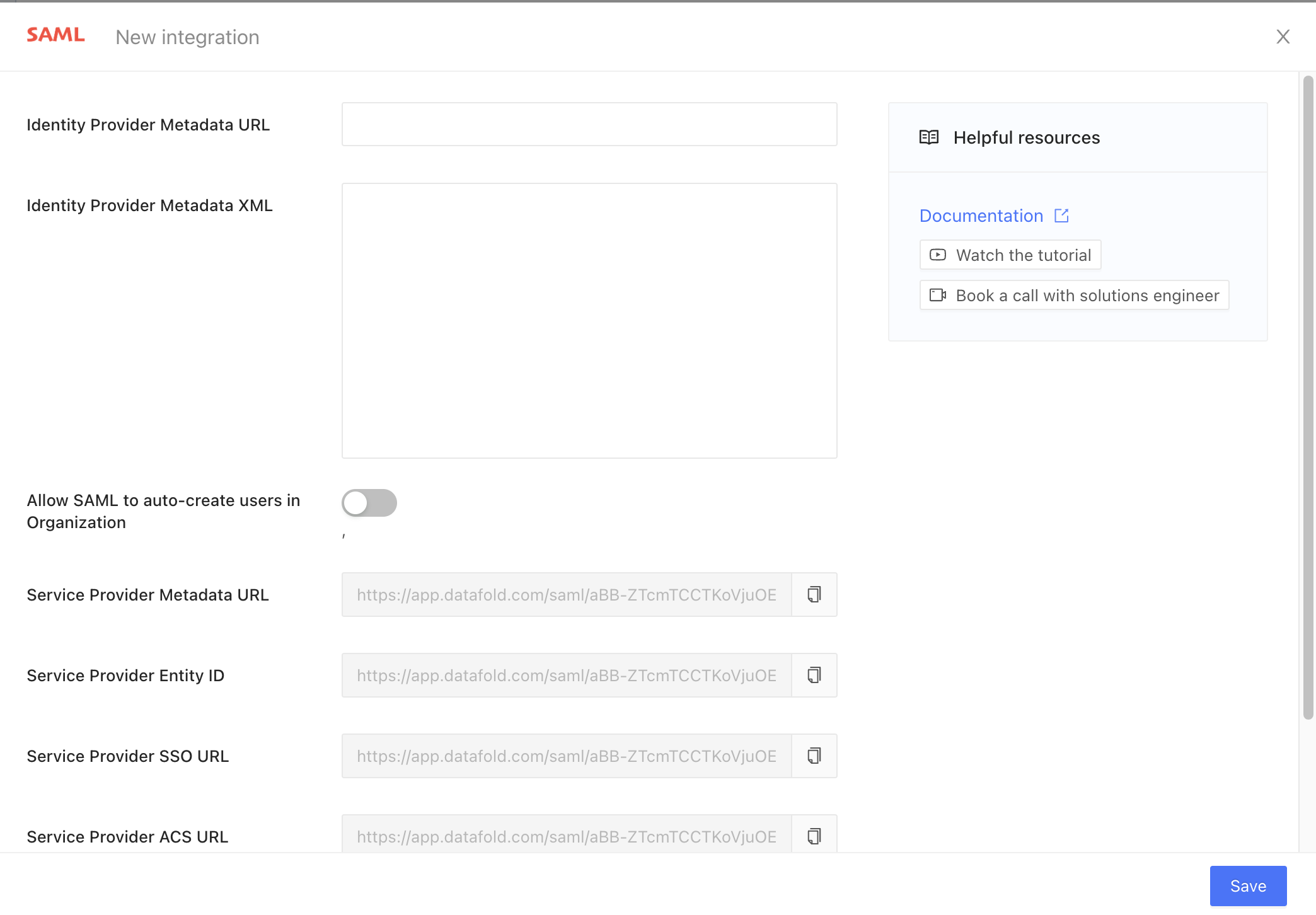 1. Go to the organization's `Identity Provider`, create a **SAML application** (sometimes called a **single sign-on** or **SSO** method).
If you have the option, enable the SAML Response signature and set it to **whole-response signing**.
1. Copy and paste the Service Provider URLs from the `Datafold` SAML Integration into the `Identity Provider`'s application setup. The only two mandatory fields are **Service Provider Entity ID** and the **Service Provider ACS URL**.
After creation, The `Identity Provider` will show you the metadata XML. It may be presented as raw XML, a URL to the XML, or an XML file to download.
**INFO**
The Identity Providers sometimes provide additional parameters, such as SSO URLs, ACS URLs, SLO URLs, etc. We gather this information from the XML directly so these can be safely ignored.
1. Paste either the **metadata XML** *or* **metadata URL** from your `Identity Provider` into the respective `Datafold` SAML integration fields.
2. Finally, click the **Save** button to create the integration.
After creation, the SAML login button will be available for Datafold users in your organization.
1. In your `Identity Provider`, activate the SAML application for all users or for select groups.
**CAUTION**
Only configured users in your identity provider will be able to login into Datafold *using* SAML SSO.
### Auto-create users in Datafold
Go to `Datafold` and navigate to **Settings** → **Integrations** → **SSO** → **SAML**.
Enable the **Allow SAML to auto-create users in Organization** switch and save the integration.
If the **Allow SAML to auto-create users in Organization** switch from the SAML Integration in Datafold is enabled, identity provider-initiated logins will automatically create users in Datafold for authenticated users.
If the **Allow SAML to auto-create users in Organization** switch from the SAML Integration in Datafold is enabled, the SAML login button will always be enabled, and all authenticated users will be automatically created in Datafold.
1. Go to the organization's `Identity Provider`, create a **SAML application** (sometimes called a **single sign-on** or **SSO** method).
If you have the option, enable the SAML Response signature and set it to **whole-response signing**.
1. Copy and paste the Service Provider URLs from the `Datafold` SAML Integration into the `Identity Provider`'s application setup. The only two mandatory fields are **Service Provider Entity ID** and the **Service Provider ACS URL**.
After creation, The `Identity Provider` will show you the metadata XML. It may be presented as raw XML, a URL to the XML, or an XML file to download.
**INFO**
The Identity Providers sometimes provide additional parameters, such as SSO URLs, ACS URLs, SLO URLs, etc. We gather this information from the XML directly so these can be safely ignored.
1. Paste either the **metadata XML** *or* **metadata URL** from your `Identity Provider` into the respective `Datafold` SAML integration fields.
2. Finally, click the **Save** button to create the integration.
After creation, the SAML login button will be available for Datafold users in your organization.
1. In your `Identity Provider`, activate the SAML application for all users or for select groups.
**CAUTION**
Only configured users in your identity provider will be able to login into Datafold *using* SAML SSO.
### Auto-create users in Datafold
Go to `Datafold` and navigate to **Settings** → **Integrations** → **SSO** → **SAML**.
Enable the **Allow SAML to auto-create users in Organization** switch and save the integration.
If the **Allow SAML to auto-create users in Organization** switch from the SAML Integration in Datafold is enabled, identity provider-initiated logins will automatically create users in Datafold for authenticated users.
If the **Allow SAML to auto-create users in Organization** switch from the SAML Integration in Datafold is enabled, the SAML login button will always be enabled, and all authenticated users will be automatically created in Datafold.