> ## Documentation Index
> Fetch the complete documentation index at: https://docs.datafold.com/llms.txt
> Use this file to discover all available pages before exploring further.
# dbt Core
> Set up Datafold’s integration with dbt Core to automate Data Diffs in your CI pipeline.
**PREREQUISITES**
* Create a [Data Connection Integration](/integrations/databases) where your dbt project data is built.
* Create a [Code Repository Integration](/integrations/code-repositories) where your dbt project code is stored.
## Getting started
To add Datafold to your continuous integration (CI) pipeline using dbt Core, follow these steps:
### 1. Create a dbt Core integration.
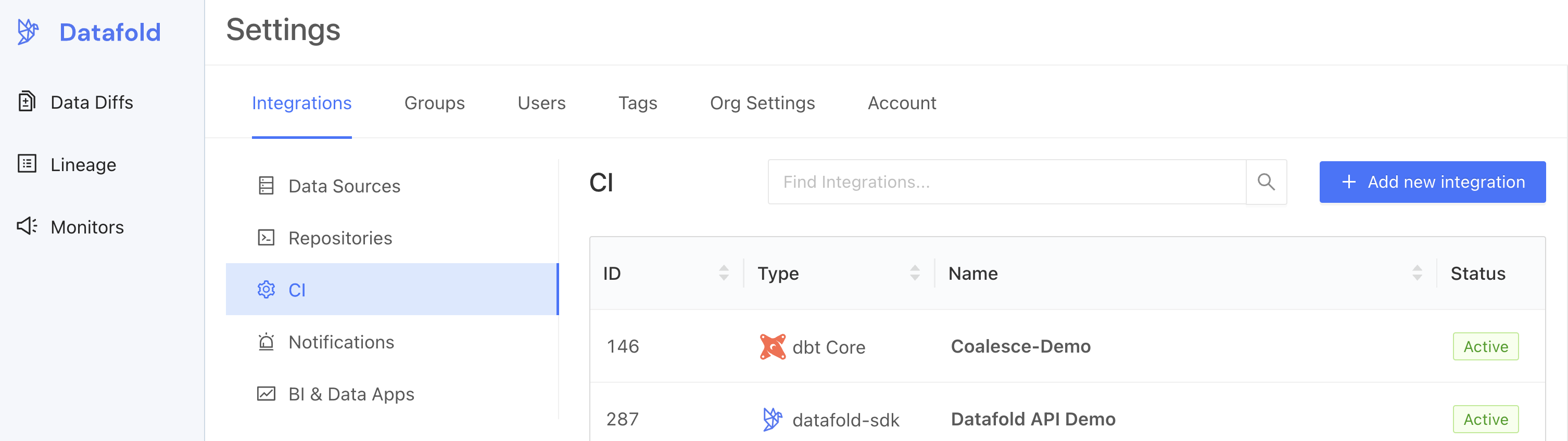 ### 2. Set up the dbt Core integration.
Complete the configuration by specifying the following fields:
#### Basic settings
| Field Name | Description |
| ------------------ | ------------------------------------------------------------------------------------------ |
| Configuration name | Choose a name for your for your Datafold dbt integration. |
| Repository | Select your dbt project. |
| Data Connection | Select the data connection your dbt project writes to. |
| Primary key tag | Choose a string for [tagging primary keys](/deployment-testing/configuration/primary-key). |
#### Advanced settings: Configuration
| Field Name | Description |
| -------------------------------- | ----------------------------------------------------------------------------------------------------------------------------------------------------------------------------------------------------------------------------------------------------------------------------------------------------------- |
| Import dbt tags and descriptions | Import dbt metadata (including column and table descriptions, tags, and owners) to Datafold. |
| Slim Diff | Data diffs will be run only for models changed in a pull request. See our [guide to Slim Diff](/deployment-testing/best-practices/slim-diff) for configuration options. |
| Diff Hightouch Models | Run Data Diffs for Hightouch models affected by your PR. |
| CI fails on primary key issues | The existence of null or duplicate primary keys will cause CI to fail. |
| Pull Request Label | When this is selected, the Datafold CI process will only run when the `datafold` label has been applied. |
| CI Diff Threshold | Data Diffs will only be run automatically for a given CI run if the number of diffs doesn't exceed this threshold. |
| Branch commit selection strategy | Select "Latest" if your CI tool creates a merge commit (the default behavior for GitHub Actions). Choose "Merge base" if CI is run against the PR branch head (the default behavior for GitLab). |
| Custom base branch | If defined, CI will run only on pull requests with the specified base branch. |
| Columns to ignore | Use standard gitignore syntax to identify columns that Datafold should never diff for any table. This can [improve performance](/faq/performance-and-scalability#how-can-i-optimize-diff-performance-at-scale) for large datasets. Primary key columns will not be excluded even if they match the pattern. |
| Files to ignore | If at least one modified file doesn’t match the ignore pattern, Datafold CI diffs all changed models in the PR. If all modified files should be ignored, Datafold CI does not run in the PR. ([Additional details.](/deployment-testing/configuration/datafold-ci/on-demand)) |
#### Advanced settings: Sampling
Sampling allows you to compare large datasets more efficiently by checking only a randomly selected subset of the data rather than every row. By analyzing a smaller but statistically meaningful sample, Datafold can quickly estimate differences without the overhead of a full dataset comparison. To learn more about how sampling can result in a speedup of 2x to 20x or more, see our [best practices on sampling](/data-diff/cross-database-diffing/best-practices#enable-sampling).
| Field Name | Description |
| ------------------- | -------------------------------------------------------------------------------------------------------------------------------------------------------------------------- |
| Enable sampling | Enable sampling for data diffs to optimize analyzing large datasets. |
| Sampling tolerance | The tolerance to apply in sampling for all data diffs. |
| Sampling confidence | The confidence to apply when sampling. |
| Sampling threshold | Sampling will be disabled automatically if tables are smaller than specified threshold. If unspecified, default values will be used depending on the Data Connection type. |
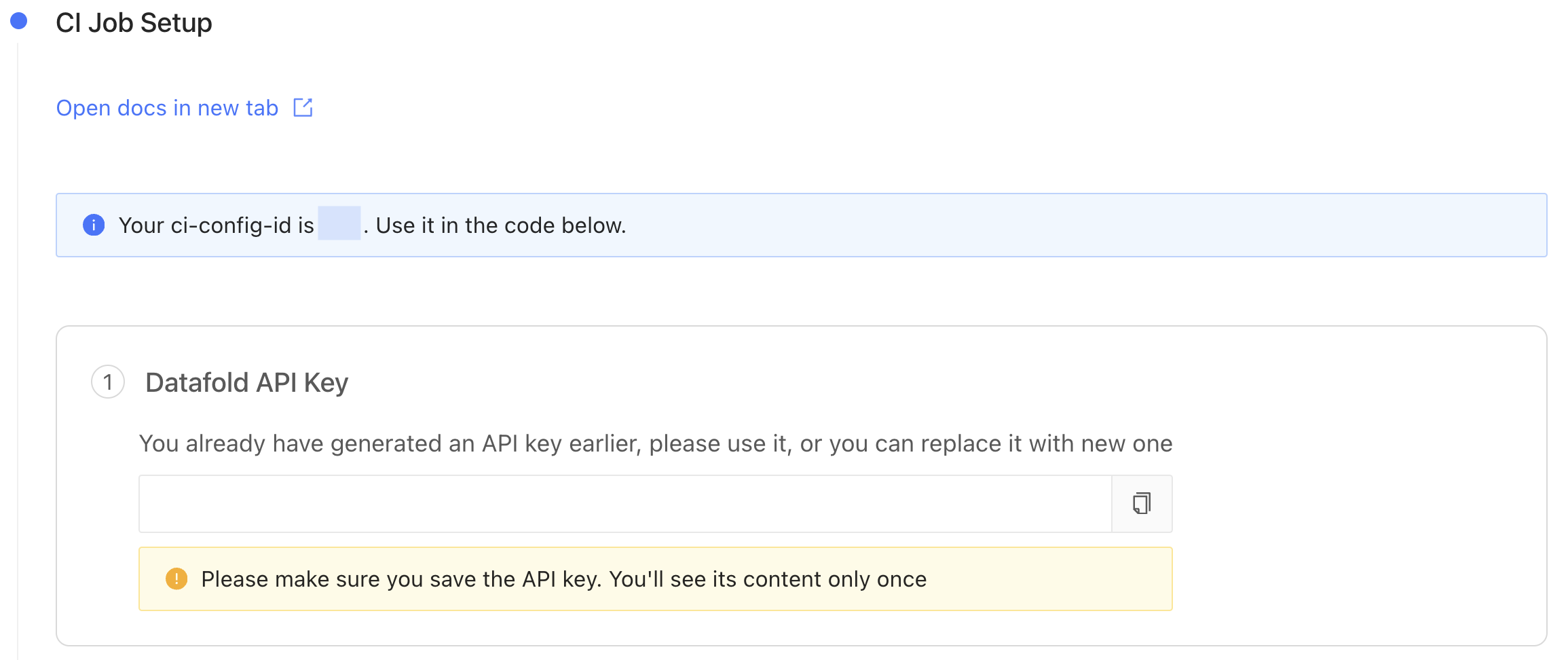
### 3. Obtain an Datafold API Key and CI config ID.
After saving the settings in step 2, scroll down and generate a new Datafold API Key and obtain the CI config ID.
### 2. Set up the dbt Core integration.
Complete the configuration by specifying the following fields:
#### Basic settings
| Field Name | Description |
| ------------------ | ------------------------------------------------------------------------------------------ |
| Configuration name | Choose a name for your for your Datafold dbt integration. |
| Repository | Select your dbt project. |
| Data Connection | Select the data connection your dbt project writes to. |
| Primary key tag | Choose a string for [tagging primary keys](/deployment-testing/configuration/primary-key). |
#### Advanced settings: Configuration
| Field Name | Description |
| -------------------------------- | ----------------------------------------------------------------------------------------------------------------------------------------------------------------------------------------------------------------------------------------------------------------------------------------------------------- |
| Import dbt tags and descriptions | Import dbt metadata (including column and table descriptions, tags, and owners) to Datafold. |
| Slim Diff | Data diffs will be run only for models changed in a pull request. See our [guide to Slim Diff](/deployment-testing/best-practices/slim-diff) for configuration options. |
| Diff Hightouch Models | Run Data Diffs for Hightouch models affected by your PR. |
| CI fails on primary key issues | The existence of null or duplicate primary keys will cause CI to fail. |
| Pull Request Label | When this is selected, the Datafold CI process will only run when the `datafold` label has been applied. |
| CI Diff Threshold | Data Diffs will only be run automatically for a given CI run if the number of diffs doesn't exceed this threshold. |
| Branch commit selection strategy | Select "Latest" if your CI tool creates a merge commit (the default behavior for GitHub Actions). Choose "Merge base" if CI is run against the PR branch head (the default behavior for GitLab). |
| Custom base branch | If defined, CI will run only on pull requests with the specified base branch. |
| Columns to ignore | Use standard gitignore syntax to identify columns that Datafold should never diff for any table. This can [improve performance](/faq/performance-and-scalability#how-can-i-optimize-diff-performance-at-scale) for large datasets. Primary key columns will not be excluded even if they match the pattern. |
| Files to ignore | If at least one modified file doesn’t match the ignore pattern, Datafold CI diffs all changed models in the PR. If all modified files should be ignored, Datafold CI does not run in the PR. ([Additional details.](/deployment-testing/configuration/datafold-ci/on-demand)) |
#### Advanced settings: Sampling
Sampling allows you to compare large datasets more efficiently by checking only a randomly selected subset of the data rather than every row. By analyzing a smaller but statistically meaningful sample, Datafold can quickly estimate differences without the overhead of a full dataset comparison. To learn more about how sampling can result in a speedup of 2x to 20x or more, see our [best practices on sampling](/data-diff/cross-database-diffing/best-practices#enable-sampling).
| Field Name | Description |
| ------------------- | -------------------------------------------------------------------------------------------------------------------------------------------------------------------------- |
| Enable sampling | Enable sampling for data diffs to optimize analyzing large datasets. |
| Sampling tolerance | The tolerance to apply in sampling for all data diffs. |
| Sampling confidence | The confidence to apply when sampling. |
| Sampling threshold | Sampling will be disabled automatically if tables are smaller than specified threshold. If unspecified, default values will be used depending on the Data Connection type. |
### 3. Obtain an Datafold API Key and CI config ID.
After saving the settings in step 2, scroll down and generate a new Datafold API Key and obtain the CI config ID.
 For production CI use, we recommend creating a [service account](/security/service-accounts) API key instead of a personal one. Service-account keys belong to your organization rather than to an individual user, so CI keeps working if the original creator leaves the team.
### 4. Configure your CI script(s) with the Datafold SDK.
Using the Datafold SDK, configure your CI script(s) to upload dbt `manifest.json` files.
The `datafold dbt upload` command takes this general form and arguments:
```
datafold dbt upload --ci-config-id --run-type --commit-sha
```
You will need to configure orchestration to upload the dbt `manifest.json` files in 2 scenarios:
1. **On merges to main.** These `manifest.json` files represent the state of the dbt project on the base/production branch from which PRs are created.
2. **On updates to PRs.** These `manifest.json` files represent the state of the dbt project on the PR branch.
The dbt Core integration creation form automatically generates code snippets that can be added to CI runners.
For production CI use, we recommend creating a [service account](/security/service-accounts) API key instead of a personal one. Service-account keys belong to your organization rather than to an individual user, so CI keeps working if the original creator leaves the team.
### 4. Configure your CI script(s) with the Datafold SDK.
Using the Datafold SDK, configure your CI script(s) to upload dbt `manifest.json` files.
The `datafold dbt upload` command takes this general form and arguments:
```
datafold dbt upload --ci-config-id --run-type --commit-sha
```
You will need to configure orchestration to upload the dbt `manifest.json` files in 2 scenarios:
1. **On merges to main.** These `manifest.json` files represent the state of the dbt project on the base/production branch from which PRs are created.
2. **On updates to PRs.** These `manifest.json` files represent the state of the dbt project on the PR branch.
The dbt Core integration creation form automatically generates code snippets that can be added to CI runners.
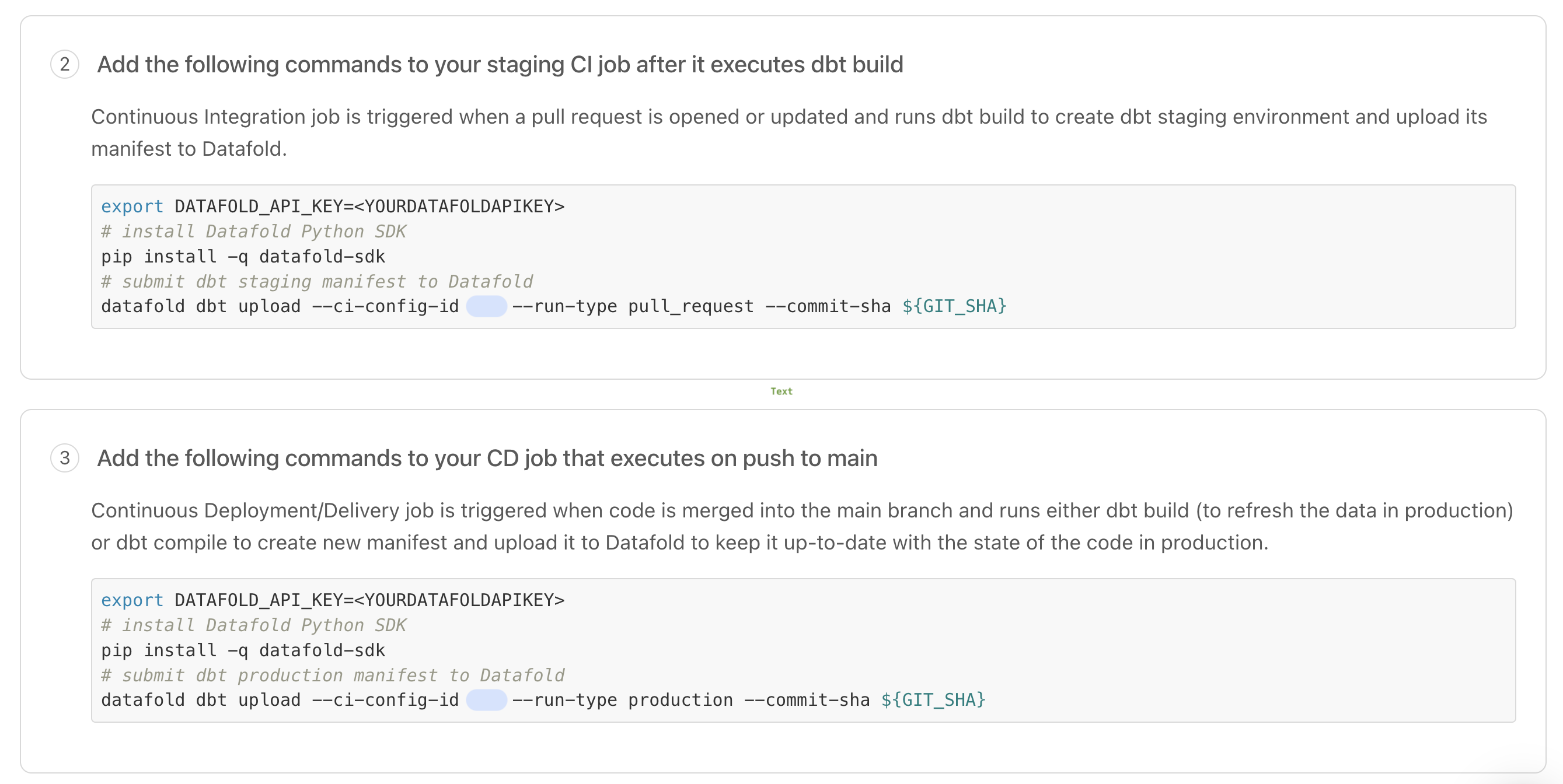 By storing and comparing these `manifest.json` files, Datafold determines which dbt models to diff in a CI run.
Implementation details vary depending on which CI tool you use. Please review [these instructions and examples](#ci-implementation-tools) to help you configure updates to your organization's CI scripts.
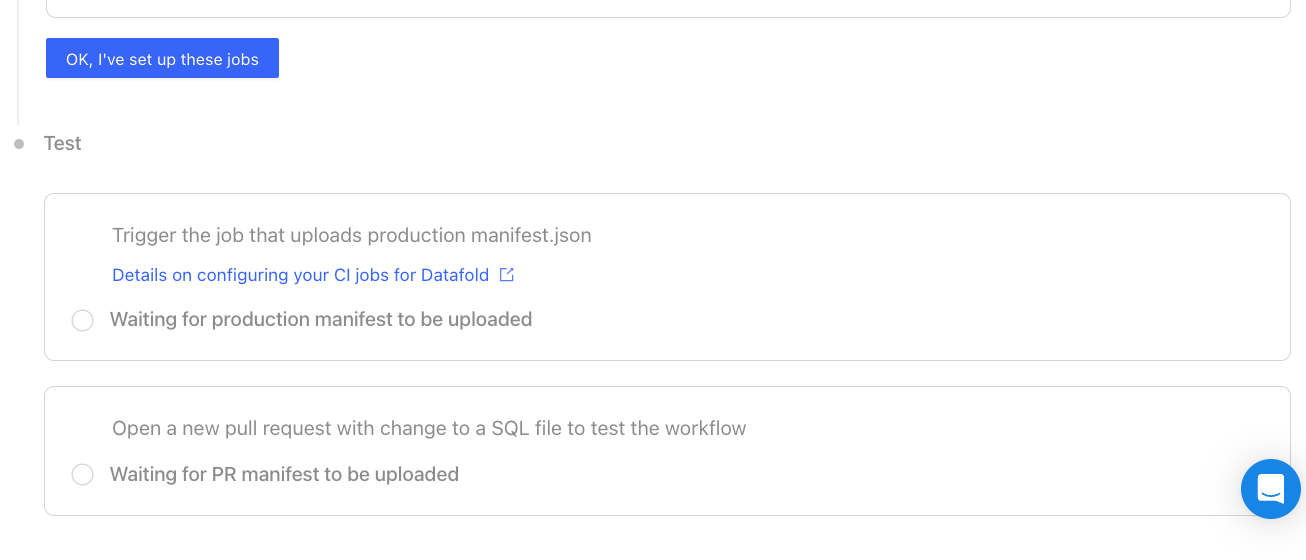
### 5. Test your dbt Core integration.
After updating your CI scripts, trigger jobs that will upload `manifest.json` files represent the base/production state.
Then, open a new pull request with changes to a SQL file to trigger a CI run.
By storing and comparing these `manifest.json` files, Datafold determines which dbt models to diff in a CI run.
Implementation details vary depending on which CI tool you use. Please review [these instructions and examples](#ci-implementation-tools) to help you configure updates to your organization's CI scripts.
### 5. Test your dbt Core integration.
After updating your CI scripts, trigger jobs that will upload `manifest.json` files represent the base/production state.
Then, open a new pull request with changes to a SQL file to trigger a CI run.
 ## CI implementation tools
We've created guides and templates for three popular CI tools.
**Having trouble setting up Datafold in CI?**
We're here to help! Please reach out and [chat with a Datafold Solutions Engineer](https://www.datafold.com/booktime).
To add Datafold to your CI tool, add `datafold dbt upload` steps in two CI jobs:
* **Upload Production Artifacts:** A CI job that build a production `manifest.json`. *This can be either your Production Job or a special Artifacts Job that runs on merge to main (explained below).*
* **Upload Pull Request Artifacts:** A CI job that builds a PR `manifest.json`.
This ensures Datafold always has the necessary `manifest.json` files, enabling us to run data diffs comparing production data to dev data.
**Upload Production Artifacts**
Add the `datafold dbt upload` step to *either* your Production Job *or* an Artifacts Job.
**Production Job**
If your dbt prod job kicks off on merges to the base branch, add a `datafold dbt upload` step after the `dbt build` step.
```bash theme={null}
name: Production Job
on:
push:
branches:
- main
jobs:
run:
runs-on: ubuntu-20.04
steps:
- name: Install Datafold SDK
run: pip install -q datafold-sdk
- name: Upload dbt artifacts to Datafold
run: datafold dbt upload --ci-config-id --run-type production --commit-sha ${GIT_SHA}
env:
DATAFOLD_API_KEY: ${{ secrets.DATAFOLD_API_KEY }}
GIT_SHA: "${{ github.sha }}"
```
**Artifacts Job**
If your existing Production Job runs on a schedule and not on merges to the base branch, create a dedicated job that runs on merges to the base branch which generates and uploads a `manifest.json` file to Datafold.
```bash theme={null}
name: Artifacts Job
on:
push:
branches:
- main
jobs:
run:
runs-on: ubuntu-20.04
steps:
- name: Install Datafold SDK
run: pip install -q datafold-sdk
- name: Generate dbt manifest.json
run: dbt ls
- name: Upload dbt artifacts to Datafold
run: datafold dbt upload --ci-config-id --run-type production --commit-sha ${BASE_GIT_SHA}
env:
DATAFOLD_APIKEY: ${{ secrets.DATAFOLD_APIKEY }}
BASE_GIT_SHA: "${{ github.sha }}"
```
**Pull Request Artifacts**
Include the `datafold dbt upload` step in your CI job that builds PR data.
```bash theme={null}
name: Pull Request Job
on:
pull_request:
push:
branches:
- '!main'
jobs:
run:
runs-on: ubuntu-20.04
steps:
- name: Install Datafold SDK
run: pip install -q datafold-sdk
- name: Upload PR manifest.json to Datafold
run: |
datafold dbt upload --ci-config-id --run-type pull_request --commit-sha ${PR_GIT_SHA}
env:
DATAFOLD_API_KEY: ${{ secrets.DATAFOLD_API_KEY }}
PR_GIT_SHA: "${{ github.event.pull_request.head.sha }}"
```
**Store Datafold API Key**
Save the API key as `DATAFOLD_API_KEY` in your [GitHub repository settings](https://docs.github.com/en/actions/security-guides/encrypted-secrets#creating-encrypted-secrets-for-a-repository).
**Upload Production Artifacts**
Add the `datafold dbt upload` step to *either* your Production Job *or* an Artifacts Job.
**Production Job**
If your dbt prod job kicks off on merges to the base branch, add a `datafold dbt upload` step after the `dbt build` step.
```bash theme={null}
version: 2.1
jobs:
prod-job:
filters:
branches:
only: main
docker:
- image: cimg/python:3.9
steps:
- checkout
- run:
name: "Install Datafold SDK"
command: pip install -q datafold-sdk
- run:
name: "Build dbt project"
command: dbt build
- run:
name: "Upload production manifest.json to Datafold"
command: |
datafold dbt upload --ci-config-id --run-type production --target-folder ./target/ --commit-sha ${CIRCLE_SHA1}
```
**Artifacts Job**
If your existing Production Job runs on a schedule and not on merges to the base branch, create a dedicated job that runs on merges to the base branch which generates and uploads a `manifest.json` file to Datafold.
```bash theme={null}
version: 2.1
jobs:
artifacts-job:
filters:
branches:
only: main
docker:
- image: cimg/python:3.9
steps:
- checkout
- run:
name: "Install Datafold SDK"
command: pip install -q datafold-sdk
- run:
name: "Generate manifest.json"
command: dbt ls --profiles-dir ./
- run:
name: "Upload production manifest.json to Datafold"
command: datafold dbt upload --ci-config-id --run-type production --target-folder ./target/ --commit-sha ${CIRCLE_SHA1}
```
**Store Datafold API Key**
Save the API key in the [CircleCI interface](https://circleci.com/docs/set-environment-variable/).
**Upload Production Artifacts**
Add the `datafold dbt upload` step to *either* your Production Job *or* an Artifacts Job.
**Production Job**
If your dbt prod job kicks off on merges to the base branch, add a `datafold dbt upload` step after the `dbt build` step.
```bash theme={null}
image:
name: ghcr.io/dbt-labs/dbt-core:1.x
run_pipeline:
stage: deploy
before_script:
- pip install -q datafold-sdk
script:
- dbt build --profiles-dir ./
- datafold dbt upload --ci-config-id --run-type production --commit-sha $CI_COMMIT_SHA
```
**Artifacts Job**
If your existing Production Job runs on a schedule and not on merges to the base branch, create a dedicated job that runs on merges to the base branch which generates and uploads a `manifest.json` file to Datafold.
```bash theme={null}
image:
name: ghcr.io/dbt-labs/dbt-core:1.x
run_pipeline:
stage: deploy
before_script:
- pip install -q datafold-sdk
script:
- dbt ls --profiles-dir ./
- datafold dbt upload --ci-config-id --run-type production --commit-sha $CI_COMMIT_SHA
```
**Store Datafold API Key**
Save the API key as `DATAFOLD_API_KEY` in [GitLab repository settings](https://docs.gitlab.com/ee/ci/yaml/index.html#secrets).
## CI for dbt multi-projects
When setting up CI for dbt multi-projects, each project should have its own dedicated CI integration to ensure that changes are validated independently.
## CI for dbt multi-projects within a monorepo
When managing multiple dbt projects within a monorepo (a single repository), it’s essential to configure individual Datafold CI integrations for each project to ensure proper isolation.
This approach prevents unintended triggering of CI processes for projects unrelated to the changes made. Here’s the recommended approach for setting it up in Datafold:
**1. Create separate CI integrations:** Create separate CI integrations within Datafold, one for each dbt project within the monorepo. Each integration should be configured to reference the same GitHub repository.
**2. Configure file filters**: For each CI integration, define file filters to specify which files should trigger the CI run. These filters prevent CI runs from being initiated when files from other projects in the monorepo are updated.
**3. Test and validate**: Before deployment, test each CI integration to validate that it triggers only when changes occur within its designated dbt project. Verify that modifications to files in one project do not inadvertently initiate CI processes for unrelated projects in the monorepo.
###
## Advanced configurations
### Skip Datafold in CI
To skip the Datafold step in CI, include the string `datafold-skip-ci` in the last commit message.
### Programmatically trigger CI runs
The Datafold app relies on the version control service webhooks to trigger the CI runs. When the dedicated cloud deployments is behind a VPN, webhooks cannot directly reach the deployment due to the network's restricted access.
We can overcome this by triggering the CI runs via the [datafold-sdk](/api-reference/datafold-sdk) in the Actions/Job Runners, assuming they're running in the same network.
Add a new Datafold SDK command after uploading the manifest in a PR job:
**Important**
When configuring your CI script, be sure to use `${{ github.event.pull_request.head.sha }}` for the **Pull Request Job** instead of `${{ github.sha }}`, which is often mistakenly used.
`${{ github.sha }}` defaults to the latest commit SHA on the branch and **will not work correctly for pull requests**.
```Bash theme={null}
- -name: Trigger CI
run: |
set -ex
datafold ci trigger --ci-config-id \
--pr-num ${PR_NUM} \
--base-branch ${BASE_BRANCH} \
--base-sha ${BASE_SHA} \
--pr-branch ${PR_BRANCH} \
--pr-sha ${PR_SHA}
env:
DATAFOLD_API_KEY: ${{ secrets.DATAFOLD_API_KEY }}
DATAFOLD_HOST: ${{ secrets.DATAFOLD_HOST }}
PR_NUM: ${{ github.event.number }}
PR_BRANCH: ${{ github.event.pull_request.head.ref }}
BASE_BRANCH: ${{ github.event.pull_request.base.ref }}
PR_SHA: ${{ github.event.pull_request.head.sha }}
BASE_SHA: ${{ github.event.pull_request.base.sha }}
```
### Running diffs before opening a PR
Some teams want to show Data Diff results in their tickets *before* creating a pull request. This speeds up code reviews as developers can QA code changes before requesting a PR review.
Check out how to automate this workflow [here](/faq/datafold-with-dbt#can-i-run-data-diffs-before-opening-a-pr).
## CI implementation tools
We've created guides and templates for three popular CI tools.
**Having trouble setting up Datafold in CI?**
We're here to help! Please reach out and [chat with a Datafold Solutions Engineer](https://www.datafold.com/booktime).
To add Datafold to your CI tool, add `datafold dbt upload` steps in two CI jobs:
* **Upload Production Artifacts:** A CI job that build a production `manifest.json`. *This can be either your Production Job or a special Artifacts Job that runs on merge to main (explained below).*
* **Upload Pull Request Artifacts:** A CI job that builds a PR `manifest.json`.
This ensures Datafold always has the necessary `manifest.json` files, enabling us to run data diffs comparing production data to dev data.
**Upload Production Artifacts**
Add the `datafold dbt upload` step to *either* your Production Job *or* an Artifacts Job.
**Production Job**
If your dbt prod job kicks off on merges to the base branch, add a `datafold dbt upload` step after the `dbt build` step.
```bash theme={null}
name: Production Job
on:
push:
branches:
- main
jobs:
run:
runs-on: ubuntu-20.04
steps:
- name: Install Datafold SDK
run: pip install -q datafold-sdk
- name: Upload dbt artifacts to Datafold
run: datafold dbt upload --ci-config-id --run-type production --commit-sha ${GIT_SHA}
env:
DATAFOLD_API_KEY: ${{ secrets.DATAFOLD_API_KEY }}
GIT_SHA: "${{ github.sha }}"
```
**Artifacts Job**
If your existing Production Job runs on a schedule and not on merges to the base branch, create a dedicated job that runs on merges to the base branch which generates and uploads a `manifest.json` file to Datafold.
```bash theme={null}
name: Artifacts Job
on:
push:
branches:
- main
jobs:
run:
runs-on: ubuntu-20.04
steps:
- name: Install Datafold SDK
run: pip install -q datafold-sdk
- name: Generate dbt manifest.json
run: dbt ls
- name: Upload dbt artifacts to Datafold
run: datafold dbt upload --ci-config-id --run-type production --commit-sha ${BASE_GIT_SHA}
env:
DATAFOLD_APIKEY: ${{ secrets.DATAFOLD_APIKEY }}
BASE_GIT_SHA: "${{ github.sha }}"
```
**Pull Request Artifacts**
Include the `datafold dbt upload` step in your CI job that builds PR data.
```bash theme={null}
name: Pull Request Job
on:
pull_request:
push:
branches:
- '!main'
jobs:
run:
runs-on: ubuntu-20.04
steps:
- name: Install Datafold SDK
run: pip install -q datafold-sdk
- name: Upload PR manifest.json to Datafold
run: |
datafold dbt upload --ci-config-id --run-type pull_request --commit-sha ${PR_GIT_SHA}
env:
DATAFOLD_API_KEY: ${{ secrets.DATAFOLD_API_KEY }}
PR_GIT_SHA: "${{ github.event.pull_request.head.sha }}"
```
**Store Datafold API Key**
Save the API key as `DATAFOLD_API_KEY` in your [GitHub repository settings](https://docs.github.com/en/actions/security-guides/encrypted-secrets#creating-encrypted-secrets-for-a-repository).
**Upload Production Artifacts**
Add the `datafold dbt upload` step to *either* your Production Job *or* an Artifacts Job.
**Production Job**
If your dbt prod job kicks off on merges to the base branch, add a `datafold dbt upload` step after the `dbt build` step.
```bash theme={null}
version: 2.1
jobs:
prod-job:
filters:
branches:
only: main
docker:
- image: cimg/python:3.9
steps:
- checkout
- run:
name: "Install Datafold SDK"
command: pip install -q datafold-sdk
- run:
name: "Build dbt project"
command: dbt build
- run:
name: "Upload production manifest.json to Datafold"
command: |
datafold dbt upload --ci-config-id --run-type production --target-folder ./target/ --commit-sha ${CIRCLE_SHA1}
```
**Artifacts Job**
If your existing Production Job runs on a schedule and not on merges to the base branch, create a dedicated job that runs on merges to the base branch which generates and uploads a `manifest.json` file to Datafold.
```bash theme={null}
version: 2.1
jobs:
artifacts-job:
filters:
branches:
only: main
docker:
- image: cimg/python:3.9
steps:
- checkout
- run:
name: "Install Datafold SDK"
command: pip install -q datafold-sdk
- run:
name: "Generate manifest.json"
command: dbt ls --profiles-dir ./
- run:
name: "Upload production manifest.json to Datafold"
command: datafold dbt upload --ci-config-id --run-type production --target-folder ./target/ --commit-sha ${CIRCLE_SHA1}
```
**Store Datafold API Key**
Save the API key in the [CircleCI interface](https://circleci.com/docs/set-environment-variable/).
**Upload Production Artifacts**
Add the `datafold dbt upload` step to *either* your Production Job *or* an Artifacts Job.
**Production Job**
If your dbt prod job kicks off on merges to the base branch, add a `datafold dbt upload` step after the `dbt build` step.
```bash theme={null}
image:
name: ghcr.io/dbt-labs/dbt-core:1.x
run_pipeline:
stage: deploy
before_script:
- pip install -q datafold-sdk
script:
- dbt build --profiles-dir ./
- datafold dbt upload --ci-config-id --run-type production --commit-sha $CI_COMMIT_SHA
```
**Artifacts Job**
If your existing Production Job runs on a schedule and not on merges to the base branch, create a dedicated job that runs on merges to the base branch which generates and uploads a `manifest.json` file to Datafold.
```bash theme={null}
image:
name: ghcr.io/dbt-labs/dbt-core:1.x
run_pipeline:
stage: deploy
before_script:
- pip install -q datafold-sdk
script:
- dbt ls --profiles-dir ./
- datafold dbt upload --ci-config-id --run-type production --commit-sha $CI_COMMIT_SHA
```
**Store Datafold API Key**
Save the API key as `DATAFOLD_API_KEY` in [GitLab repository settings](https://docs.gitlab.com/ee/ci/yaml/index.html#secrets).
## CI for dbt multi-projects
When setting up CI for dbt multi-projects, each project should have its own dedicated CI integration to ensure that changes are validated independently.
## CI for dbt multi-projects within a monorepo
When managing multiple dbt projects within a monorepo (a single repository), it’s essential to configure individual Datafold CI integrations for each project to ensure proper isolation.
This approach prevents unintended triggering of CI processes for projects unrelated to the changes made. Here’s the recommended approach for setting it up in Datafold:
**1. Create separate CI integrations:** Create separate CI integrations within Datafold, one for each dbt project within the monorepo. Each integration should be configured to reference the same GitHub repository.
**2. Configure file filters**: For each CI integration, define file filters to specify which files should trigger the CI run. These filters prevent CI runs from being initiated when files from other projects in the monorepo are updated.
**3. Test and validate**: Before deployment, test each CI integration to validate that it triggers only when changes occur within its designated dbt project. Verify that modifications to files in one project do not inadvertently initiate CI processes for unrelated projects in the monorepo.
###
## Advanced configurations
### Skip Datafold in CI
To skip the Datafold step in CI, include the string `datafold-skip-ci` in the last commit message.
### Programmatically trigger CI runs
The Datafold app relies on the version control service webhooks to trigger the CI runs. When the dedicated cloud deployments is behind a VPN, webhooks cannot directly reach the deployment due to the network's restricted access.
We can overcome this by triggering the CI runs via the [datafold-sdk](/api-reference/datafold-sdk) in the Actions/Job Runners, assuming they're running in the same network.
Add a new Datafold SDK command after uploading the manifest in a PR job:
**Important**
When configuring your CI script, be sure to use `${{ github.event.pull_request.head.sha }}` for the **Pull Request Job** instead of `${{ github.sha }}`, which is often mistakenly used.
`${{ github.sha }}` defaults to the latest commit SHA on the branch and **will not work correctly for pull requests**.
```Bash theme={null}
- -name: Trigger CI
run: |
set -ex
datafold ci trigger --ci-config-id \
--pr-num ${PR_NUM} \
--base-branch ${BASE_BRANCH} \
--base-sha ${BASE_SHA} \
--pr-branch ${PR_BRANCH} \
--pr-sha ${PR_SHA}
env:
DATAFOLD_API_KEY: ${{ secrets.DATAFOLD_API_KEY }}
DATAFOLD_HOST: ${{ secrets.DATAFOLD_HOST }}
PR_NUM: ${{ github.event.number }}
PR_BRANCH: ${{ github.event.pull_request.head.ref }}
BASE_BRANCH: ${{ github.event.pull_request.base.ref }}
PR_SHA: ${{ github.event.pull_request.head.sha }}
BASE_SHA: ${{ github.event.pull_request.base.sha }}
```
### Running diffs before opening a PR
Some teams want to show Data Diff results in their tickets *before* creating a pull request. This speeds up code reviews as developers can QA code changes before requesting a PR review.
Check out how to automate this workflow [here](/faq/datafold-with-dbt#can-i-run-data-diffs-before-opening-a-pr).